
An order can be cancelled from the portal if a role is withdrawn, a candidate drops out, or the order was placed in error. This guide covers where to do it, when it is possible, and what to consider first.
On this page
Before you cancel
Cancelling cannot be undone from the portal. If the problem is a detail on the order rather than the order itself, it is usually better to contact us than to cancel and start again.
| If the problem is | Do this |
|---|---|
| The candidate has withdrawn, or the role has gone | Cancel the order |
| The order was placed against the wrong candidate | Cancel the order, then place a new one |
| The email address is wrong | Contact Verifile rather than cancelling |
| The wrong package or checks were chosen | Contact Verifile, who can advise |
| You are unsure whether screening has started | Check the order first, see below |
Tip Open the order and look at Check Details before you cancel. If checks have already returned results, work has been done, and it is worth speaking to us first.
Cancelling from the orders list
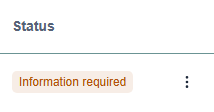
Select the three dot menu at the end of the order’s row, then Cancel order.
Cancelling from inside an order
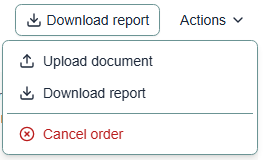
Open the order, then choose Actions at the top right and Cancel order. The same options are available either way, so use whichever you are already in.
When cancelling is available
The option appears while an order is still live and disappears once it has been cancelled, so you cannot cancel the same order twice.
| Status | Can it be cancelled |
|---|---|
| Awaiting candidate entry | Yes |
| Information required | Yes |
| Processing | Yes, but work is underway, so speak to us first |
| Completed | The option is shown, but see the note below |
| Cancelled | No, the option is not offered |
Note On a completed order the screening has already finished and the report is available, so cancelling is not normally what you want. If a completed order looks wrong, contact us rather than cancelling it.
What happens afterwards
The order moves to Cancelled and stays in your list, so you keep a record of it. You can still open it and download any report that already existed.
TO CONFIRM BEFORE PUBLISHING Three things still need checking with the service team, and they are deliberately not answered here rather than guessed at. First, whether a confirmation step follows and what it says. Second, whether any charge applies for work already carried out. Third, what happens to the candidate’s link and to anything they have already submitted. Delete this note once the answers are in.
If you cancel by mistake
Contact Verifile as soon as you can. A cancelled order cannot be reopened from the portal, but the sooner we know, the more likely it is that something can be done.
Cancelling before an order is placed
If you are still building an order and want to abandon it, select Cancel in the form. You will be asked to confirm, because a part built order is not saved and anything entered so far is lost.
Related articles
Was this article helpful?
That’s Great!
Thank you for your feedback
Sorry! We couldn't be helpful
Thank you for your feedback
Feedback sent
We appreciate your effort and will try to fix the article