
Candidate details are entered at stage two of an order. Most of the time this is five fields and takes a moment, because the candidate supplies everything else themselves. Some checks ask for more, and the form only shows what is actually needed, so what you see depends on the checks you chose at stage one.
On this page
What is always needed
Five fields, whatever the order.
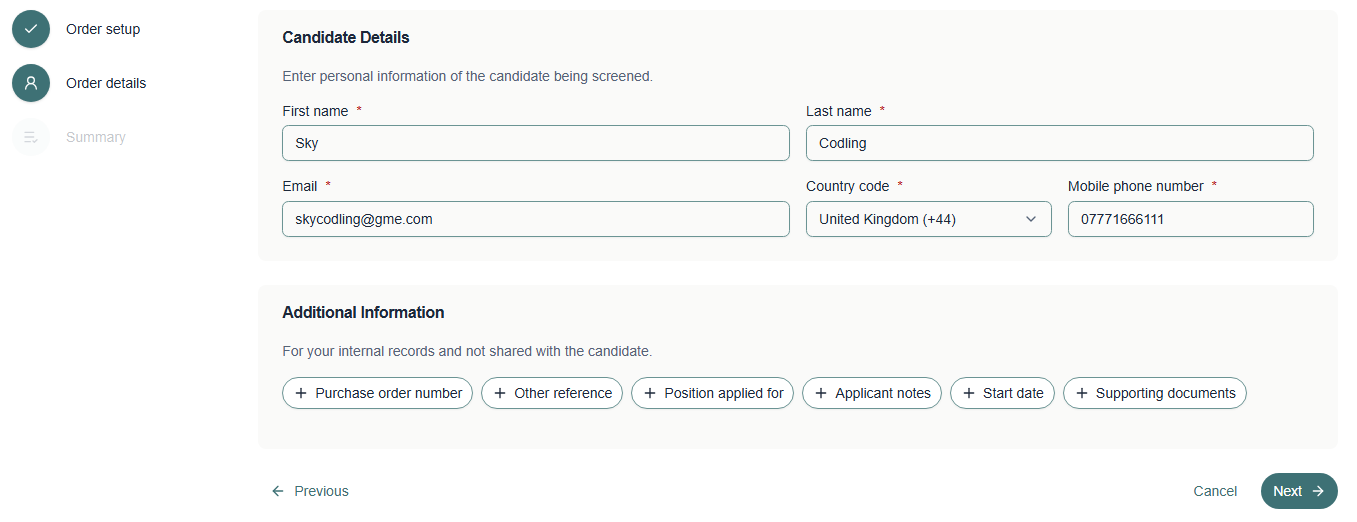
| Field | Notes |
|---|---|
| First name | Between 2 and 60 characters |
| Last name | Between 2 and 60 characters |
| Where the welcome email is sent, so this one matters most | |
| Country code | Defaults to United Kingdom, change it if the candidate is elsewhere |
| Mobile phone number | Between 2 and 50 characters, used for reminders |
Tip A very short name can fail the minimum length. If a one letter surname is genuinely correct, contact us rather than padding it out with a full stop or a repeated letter.
What you do not need
You do not need the candidate’s date of birth, address history, previous employers, qualifications or documents. The candidate provides all of that themselves after they receive the welcome email, and they provide it directly to us.
Note This is deliberate. It keeps personal information out of your systems where it does not need to be, and means you are not holding data about somebody you may not end up employing.
When the form asks for more
Certain checks need information only you can give us, so extra questions appear once those checks are on the order. They are required, and the order cannot be placed without them.
| If the order includes | You will also be asked for |
|---|---|
| A basic DBS check | The purpose of the check |
| A basic DBS check for paid work | The position applied for, the employment sector, and the employer name |
| A standard or enhanced DBS check | The DBS job role |
| A CIFAS check | Whether the candidate is a working member |
| A package including activity years | How many years of activity are required, up to ten |
Tip If a field appears that you were not expecting, it is because of a check on the order rather than anything you have done. Working through whatever the form shows is always the right approach.
The purpose of a DBS check decides whether the employment questions appear at all, so answer that one first and the rest will follow.
Getting the email address right
The email address is the one thing worth checking twice. It is where the welcome email goes, and until the candidate acts on it nothing happens: the order simply sits at Awaiting candidate entry.
- Check the spelling against whatever the candidate gave you, rather than typing it from memory
- Use a personal address rather than a current employer’s where you can, since people lose access to work email when they move on
- Avoid shared or team addresses, because the link is personal to the candidate
Tip If a candidate says they never received the welcome email, the address on the order is the first thing to check. Open the order and look at the Candidate tab.
After you have entered them
Select Next to reach the summary. Nothing is sent to the candidate until you place the order, so you can still go back and correct anything.
Warning Once the order is placed the candidate details cannot be edited in the portal. If something is wrong, contact Verifile rather than placing a second order.
Related articles
Was this article helpful?
That’s Great!
Thank you for your feedback
Sorry! We couldn't be helpful
Thank you for your feedback
Feedback sent
We appreciate your effort and will try to fix the article