
Successfully sign in to the Customer Portal.
On this page
- •Before you start
- •Signing in
- -Can't sign in?
- -The user doesn't have an account
- -The account is locked
- -The user account has not yet been migrated
- -There's an outage with one of our services preventing sign in
- -The wrong email address may have been used to try to sign in
- -The One-Time Passcode (OTP) email code is incorrect or has expired
Before you start
You should have received your email invite to the Customer Portal. If you haven't, please reach out to the Client Services Team at the number below or top right. Alternatively, you can contact the Onboarding Team via success@verifile.co.uk.
Signing in
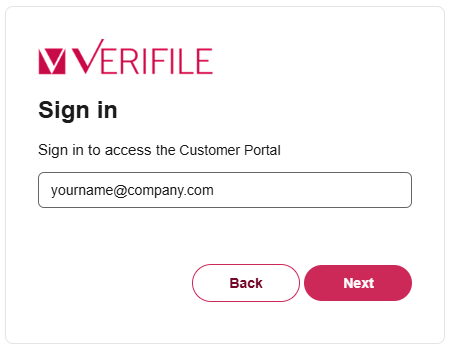
- Input your work email address and select Next.
- You'll be sent a one-time code to your email address. Please input this into the required field to access the Customer Portal.
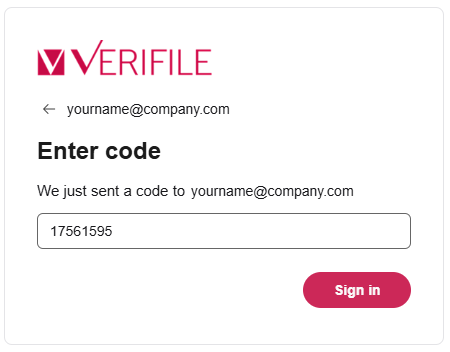
Note: OTP email codes expire after 30 minutes. Be sure to use it within that time, or you'll need to request a new one.
If something didn't work
Can't sign in?
There are various reasons that you can't sign in, common ones are:
- The user doesn't have an account
- The account is locked
- The user's account has not been migrated, and they don't yet have access to the Customer Portal
- There's an outage with one of our services preventing sign in
- The wrong email address may have been used to try to sign in
- The One-Time Passcode (OTP) email code is incorrect or has expired
The user doesn't have an account
Your account might be mid-migration or waiting on finalisation, we urge you to try again later. If, by the next day it isn't active, please contact us for support.
The account is locked
This may be due to protect your account and would require that you contact us directly to unlock it.
The user account has not yet been migrated
Your account might be mid-migration or waiting on finalisation, we urge you to try again later. If, by the next day it isn't active, please contact us for support.
There's an outage with one of our services preventing sign in
Like all modern systems, there may be the occasional hiccup. It's quite normal, and we endeavour to resolve any such occurrences swiftly. Please try later.
The wrong email address may have been used to try to sign in
Please check the spelling of the email address you're entering and double check that your admin has supplied the correct address.
The One-Time Passcode (OTP) email code is incorrect or has expired
If you didn't receive a one-time passcode, please check your junk mail folder for the email, and if that doesn't resolve the issue, contact the team directly via one of the approved methods. Live Chat (Bottom right), Email or Telephone.
Need help?
Live Chat is available on the right, and you can self-serve via our Help Centre.
Call us at +44 (0) 1234 339 350 (Monday to Friday, 8:30 a.m. to 5:30 p.m. U.K. time).
Email service@verifile.co.uk.
Was this article helpful?
That’s Great!
Thank you for your feedback
Sorry! We couldn't be helpful
Thank you for your feedback
Feedback sent
We appreciate your effort and will try to fix the article