
Alongside the candidate’s details you can record information for your own purposes, such as a purchase order number or the role applied for. None of it is shared with the candidate, and all of it is optional, but some of it makes the screening go more smoothly.
On this page
- •Where to find them
- •What each one is for
• The two worth adding every time(click here to show/hide contents)
- •Applicant notes, and what belongs there
- •Supporting documents
Where to find them
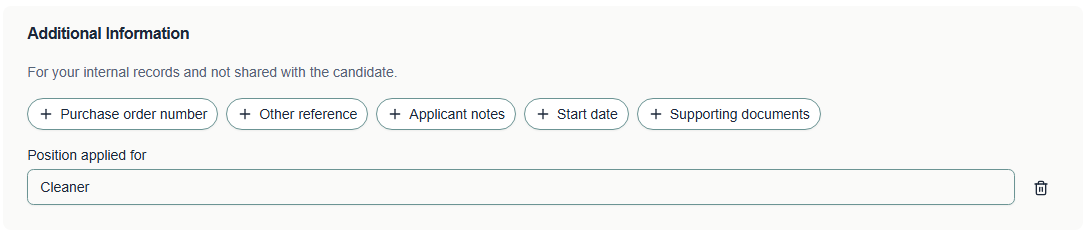
At stage two of the order, below the candidate details, under Additional Information. Each field starts as a button. Select one to add it, fill it in, and use the bin icon beside it if you change your mind.
Note Nothing in this section is shown to the candidate. It does reach Verifile, and our team can see it against the order, so it is a way of telling us something as well as a record for you.
What each one is for
Everything here reaches our team alongside the order, so anything you record is visible to the people carrying out the screening.
| Field | Use it for | Worth adding when |
|---|---|---|
| Purchase order number | Your finance reference, carried onto the invoice | Your organisation requires a PO before it will pay |
| Other reference | Any other reference you file the order against | You track candidates in your own system |
| Position applied for | The role being recruited for | Almost always, see below |
| Applicant notes | Anything your team should know about this candidate | There is something unusual you would otherwise query |
| Start date | When the candidate is due to start | The start date is close, so you can see the urgency |
| Supporting documents | Anything relevant you already hold | You have a document that saves the candidate supplying it |
The two worth adding every time
Position applied for
This tells your team what the screening is for, which helps you judge what is relevant and what is not. It also appears on the order, so anyone looking at it later can see the context without asking.
Start date
Screening has no way of knowing your deadline unless you give it one. A start date lets you see which orders are time critical, and it is the first thing you look at when you ask us to prioritise something.
Tip If a start date changes after the order is placed, tell us. We cannot see your recruitment system. QUERIED
Applicant notes, and what belongs there
Applicant notes are for context that helps the screening: a known gap in employment, a name change, a period spent abroad, anything that would otherwise look like a discrepancy and generate a query.
Tip Applicant notes are read by the team handling the screening, so this is the right place to tell us something rather than sending a separate email.
Warning Do not use this field for information about a candidate’s health, ethnicity, religion, sexuality, trade union membership or any other special category data. It is not needed for screening and should not be recorded here.
Supporting documents
If you already hold something the candidate would otherwise have to supply, attaching it here saves them a step. Only attach what is relevant to the screening.
Related articles
Was this article helpful?
That’s Great!
Thank you for your feedback
Sorry! We couldn't be helpful
Thank you for your feedback
Feedback sent
We appreciate your effort and will try to fix the article